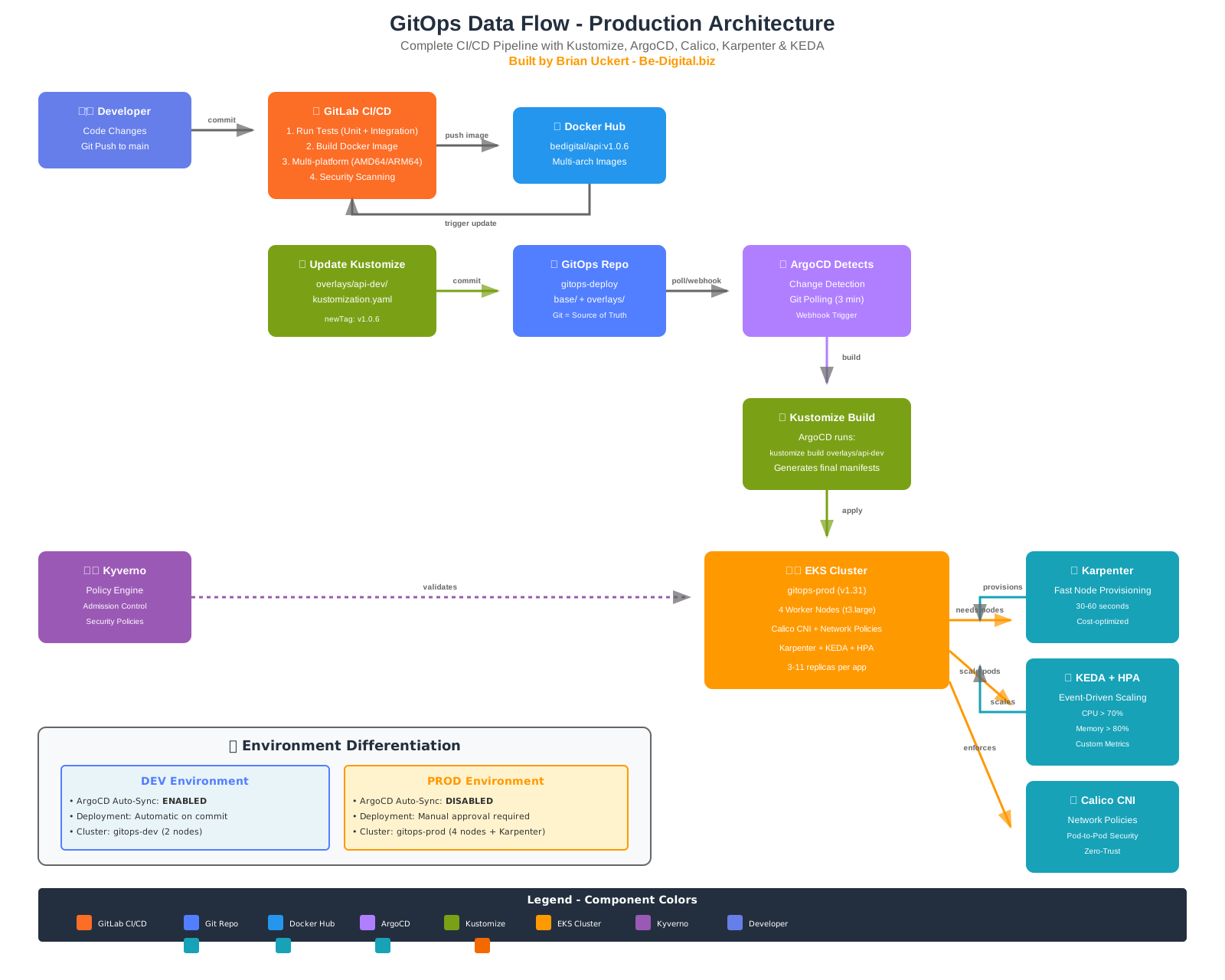
📋 Project Overview
A complete, production-ready GitOps implementation demonstrating modern cloud-native practices on AWS. This project showcases enterprise-grade infrastructure automation, multi-cluster management, and comprehensive CI/CD pipelines.
🚀 Advanced Features Implemented:
- Calico CNI: Advanced networking with network policies and BGP routing
- Karpenter: Fast, efficient node auto-scaling (provisions nodes in seconds)
- KEDA: Event-driven pod autoscaling with custom metrics
- HPA: Horizontal Pod Autoscaler for application scaling (3-11 replicas)
- Grafana Cloud: Enterprise observability with Alloy agents
- Kyverno: Policy-as-code for security and compliance
🏗️ Architecture
Multi-Cluster Design
Complete environment isolation with separate EKS clusters for DEV and PROD, each with its own ArgoCD instance, VPC, and security controls.
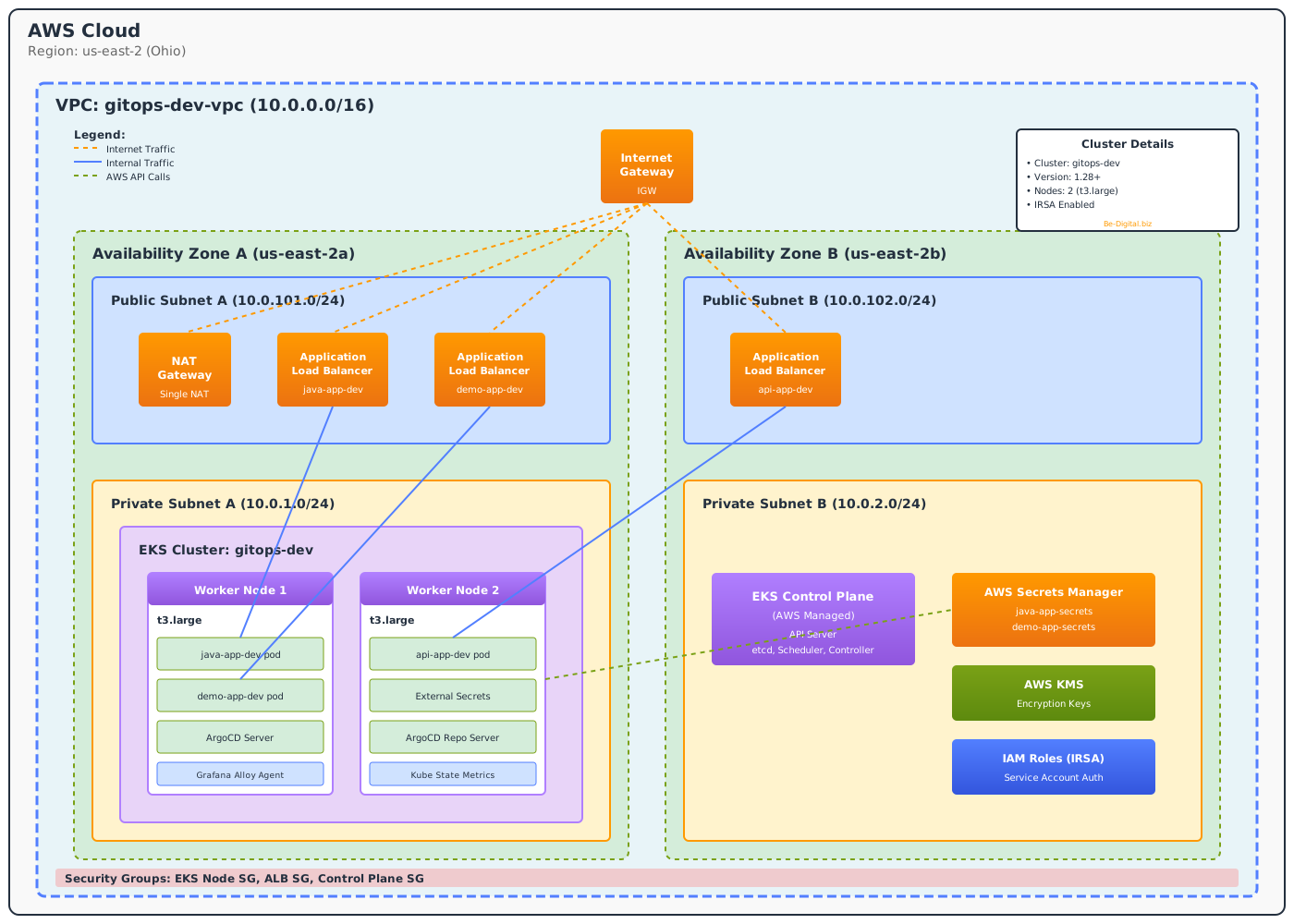
DEV Cluster Architecture - 2 nodes, single NAT gateway for cost optimization

PROD Cluster Architecture - 2 managed + Karpenter SPOT nodes, dual NAT gateways for high availability
🎯 Key Architectural Decisions:
- Separate Clusters: Complete blast radius isolation between DEV and PROD
- Multi-AZ Deployment: High availability across availability zones
- Topology Spread: Pods distributed across AZs to survive zone failures
- Pod Disruption Budgets: Minimum availability guaranteed during maintenance
- GitOps-First: All changes flow through Git - no manual kubectl commands
- Infrastructure as Code: 100% Terraform-managed infrastructure
- Security by Default: IRSA, External Secrets Operator, Kyverno policies
🛠️ Technology Stack
☁️ Cloud Platform
- AWS EKS (Kubernetes 1.31)
- VPC with public/private subnets
- Application Load Balancers
- AWS Secrets Manager
- KMS for encryption
- EFS for shared storage (RWX)
- VPC Endpoints (9 total)
🔄 GitOps & CI/CD
- ArgoCD (auto-sync in DEV)
- GitLab CI/CD pipelines
- Kustomize for config management
- Multi-platform Docker builds
- Automated testing
🏗️ Infrastructure
- Terraform (modular design)
- Remote state (S3 + DynamoDB)
- External Secrets Operator
- AWS Load Balancer Controller
- IRSA for pod-level permissions
- EFS CSI Driver for persistent storage
- EBS CSI Driver (legacy)
⚡ Auto-Scaling
- Karpenter (node scaling)
- KEDA (event-driven)
- HPA (3-11 replicas)
- Fast provisioning (seconds)
- Cost-optimized scaling
- Multi-AZ distribution
📊 Observability
- Grafana Cloud (SaaS)
- Grafana Alloy agents
- Prometheus metrics
- Loki log aggregation
- Kube State Metrics
- Node Exporter
🔒 Security & Policy
- Kyverno (policy engine)
- Spring Security (Basic Auth)
- External Secrets Operator
- AWS Secrets Manager
- Network isolation
- IRSA for AWS access
💻 Applications
- Java Spring Boot API
- Node.js Express apps
- React frontends
- REST APIs
- Health check endpoints
🌐 Live Endpoints
All applications are running live on AWS EKS. Click the links to see them in action!
DEV Cluster (us-east-2)
| Application | Description | Endpoint |
|---|---|---|
| Java Spring Boot API | REST API with Spring Security | https://dev-java.thunk-it.com |
| Demo App | React welcome page | https://dev-demo.thunk-it.com |
| API App | Node.js REST API | https://dev-api.thunk-it.com |
| ArgoCD | GitOps deployment dashboard | http://dev-argocd.thunk-it.com |
🔄 DEV Environment Features:
- Auto-Sync Enabled: Changes deploy automatically from Git
- Self-Heal: Drift is automatically corrected
- Cost-Optimized: 2 nodes, single NAT gateway, smaller instances
- Same DNS Pattern: Uses
dev-*.thunk-it.comsubdomains
PROD Cluster (us-east-2)
| Application | Description | Endpoint |
|---|---|---|
| Java Spring Boot API | REST API with Spring Security (Basic Auth) | https://java.thunk-it.com |
| Demo App | React welcome page | https://demo.thunk-it.com |
| API App | Node.js REST API | https://api.thunk-it.com |
| ArgoCD | GitOps deployment dashboard | http://argocd.thunk-it.com |
🎯 Production Features:
- Custom Domains: *.thunk-it.com with Route 53 DNS
- HTTPS/TLS: ACM certificates with automatic renewal
- Karpenter-First Architecture: 2 managed nodes (HA) + Karpenter SPOT nodes
- Karpenter Scaling: Fast SPOT node provisioning (~70% cost savings)
- KEDA + HPA: Event-driven pod autoscaling (3-11 replicas)
- Calico CNI: Network policies for pod-to-pod security
- Multi-AZ HA: Dual NAT gateways for high availability
- Topology Spread: Pods distributed across AZs via topologySpreadConstraints
- Pod Disruption Budgets: minAvailable: 2 protects against node drains
⚡ Advanced Auto-Scaling Architecture
Production cluster implements a sophisticated multi-layer auto-scaling strategy combining Karpenter for node management, KEDA for event-driven scaling, and HPA for application-level scaling.
🎯 Why This Matters:
Traditional Cluster Autoscaler can take 3-5 minutes to provision new nodes. Karpenter provisions nodes in seconds, dramatically improving application responsiveness during traffic spikes. Combined with KEDA's event-driven scaling and HPA's metric-based scaling, this creates a highly responsive, cost-optimized infrastructure.
1. Karpenter v1.0.5 - Node Auto-Scaling
🚀 Fast Node Provisioning
- Speed: Provisions nodes in 30-60 seconds (vs 3-5 minutes with Cluster Autoscaler)
- Efficiency: Bin-packing algorithm for optimal resource utilization
- Cost Optimization: Automatically selects cheapest instance types that meet requirements
- Spot Instance Support: Can use Spot instances for 70% cost savings
- Multi-AZ: Distributes nodes across availability zones for HA
- Consolidation: Automatically replaces nodes with cheaper options when possible
Current Configuration:
- Version: v1.0.5 (latest stable, K8s 1.31 compatible)
- Replicas: 2 for high availability
- Namespace: kube-system (v1.0 recommendation for API priority)
- API Version: v1 (stable, graduated from v1beta1)
- Architecture: 2 managed nodes (for Karpenter HA) + SPOT nodes for workloads
- Deployment: GitOps via ArgoCD with manual sync for production safety
⚠️ Private VPC Requirements (Critical!):
- AWS_ISOLATED_VPC=true: Required for private clusters to avoid us-east-1 pricing API calls
- clusterCIDR: Must be manually configured (e.g., 172.20.0.0/16) in isolated VPC mode
- aws-auth ConfigMap: Must include KarpenterNodeRole - nodes can't join cluster without it!
- VPC Endpoints: 9 endpoints required for private subnet connectivity:
- STS - Security Token Service for IRSA. Every pod with IRSA calls
sts:AssumeRoleWithWebIdentityto get AWS credentials. Critical for all AWS SDK operations. - EC2 - EBS CSI driver, Karpenter node provisioning
- EKS - Karpenter cluster endpoint discovery
- EFS - EFS CSI driver for shared storage
- SSM - Karpenter AMI discovery via Parameter Store
- SSM Messages - SSM Session Manager
- EC2 Messages - SSM agent communication
- ELB - AWS Load Balancer Controller
- Secrets Manager - External Secrets Operator
- STS - Security Token Service for IRSA. Every pod with IRSA calls
- AMI Family: Use AL2023 for EKS 1.31+ clusters (AL2 is deprecated)
This is where Terraform IaC comes in handy:
All these requirements are codified in Terraform - VPC endpoints, aws-auth ConfigMap, Karpenter IAM roles. No manual setup, no configuration drift.
2. KEDA - Event-Driven Autoscaling
📊 Event-Driven Pod Scaling (Deployed via Terraform)
- Custom Metrics: Scale based on any metric (queue depth, HTTP requests, database connections)
- External Scalers: Integrates with AWS CloudWatch, Prometheus, Kafka, RabbitMQ, etc.
- Scale to Zero: Can scale applications down to 0 replicas when idle
- Fine-Grained Control: More sophisticated than basic HPA metrics
- Multi-Metric Scaling: Scale based on multiple metrics simultaneously
Current Configuration:
- Managed by: Terraform (gitops-infra/modules/keda/)
- Version: 2.16.1 (Helm chart)
- KEDA Operator running in keda namespace
- KEDA Metrics API Server for custom metrics
- Admission webhooks for validation
- Integrated with HPA for seamless scaling
3. HPA - Horizontal Pod Autoscaler
📈 Application-Level Scaling
- CPU-Based: Scale when CPU exceeds 70%
- Memory-Based: Scale when memory exceeds 80%
- Custom Metrics: Can use KEDA-provided metrics
- Replica Ranges: Min 3, Max 11 replicas per application
Current Status:
| Application | Current Replicas | Min/Max | CPU Usage | Memory Usage |
|---|---|---|---|---|
| java-app-prod | 3 | 3 / 10 | 0% | 34% |
| demo-app-prod | 3 | 3 / 9 | 1% | 62% |
| api-app-prod | 3 | 3 / 11 | 1% | 34% |
Scaling Flow
💰 Cost Benefits:
- Right-Sizing: Karpenter selects optimal instance types, avoiding over-provisioning
- Fast Scale-Down: Removes unused nodes quickly, reducing waste
- Spot Instance Support: Can use Spot instances for 70% savings on non-critical workloads
- Bin-Packing: Efficient pod placement reduces total node count
- Estimated Savings: 30-50% compared to static node groups
🌐 Calico CNI - Advanced Networking
Production cluster uses Calico CNI in policy-only mode alongside AWS VPC CNI. Calico is deployed via Terraform using the Tigera Operator Helm chart.
🎯 Why Calico Over AWS VPC CNI?
- Network Policies: Native Kubernetes NetworkPolicy support for pod-to-pod security
- GlobalNetworkPolicies: CIDR-based rules for ALB, AWS APIs, external services
- BGP Routing: Advanced routing capabilities for complex network topologies
- Multi-Cloud Ready: Same CNI works across AWS, Azure, GCP, on-prem
- Observability: Better network flow visibility and troubleshooting
🏗️ Deployment Architecture:
- Managed by: Terraform (gitops-infra/modules/calico/)
- Tigera Operator: Runs in tigera-operator namespace
- Calico Components: Run in calico-system namespace
- Mode: Policy-only (VPC CNI handles networking)
- Version: v3.29.1
BGP Routing Explained:
Calico can use BGP (Border Gateway Protocol) to advertise pod IP routes between nodes:
- Each node tells other nodes "I have pods with IPs 10.1.x.x, send traffic to me"
- Enables direct pod-to-pod communication without overlay encapsulation
- More efficient than VXLAN for large clusters
For this POC: Using Calico's default VXLAN mode, not full BGP. BGP is more relevant for on-prem or hybrid cloud scenarios.
Current Deployment
📊 Calico Components (Deployed via Terraform)
- Tigera Operator: Manages Calico lifecycle in tigera-operator namespace
- Calico Node: DaemonSet running on all worker nodes (2 managed + Karpenter SPOT)
- Calico Typha: Scalable datastore cache for large clusters
- Calico Controller: Manages Calico resources and policies
- Network Policies: Enforced at the pod level for zero-trust networking
✅ Network Policies Implemented (via GitOps/ArgoCD):
- 12 Kubernetes NetworkPolicies (4 per namespace × 3 app namespaces)
- 4 Calico GlobalNetworkPolicies for CIDR-based rules
| Policy | Type | Purpose |
|---|---|---|
| default-deny-all | NetworkPolicy | Block all ingress by default (per namespace) |
| allow-ingress-from-alb | NetworkPolicy | Allow VPC CIDR (10.1.0.0/16) → app ports |
| allow-dns | NetworkPolicy | Allow DNS egress to kube-system |
| allow-monitoring | NetworkPolicy | Allow metrics scrape from kube-system |
| allow-alb-ingress | GlobalNetworkPolicy | CIDR-based ALB ingress (public subnets) |
| allow-aws-apis-egress | GlobalNetworkPolicy | Allow egress to AWS API IPs (3.x, 18.x, 52.x, 54.x) |
| allow-grafana-cloud-egress | GlobalNetworkPolicy | Allow egress to Grafana Cloud IPs |
| default-deny-external-egress | GlobalNetworkPolicy | Deny all other external egress |
🔒 Security Benefits:
- Zero-Trust Networking: Default deny, explicit allow policies
- Microsegmentation: Fine-grained control over pod-to-pod traffic
- Compliance: Meets PCI-DSS, HIPAA network isolation requirements
- Audit Trail: Network policy changes tracked in Git
📦 Kustomize - Configuration Management
Kustomize is the backbone of our GitOps configuration strategy, enabling environment-specific customizations without duplicating YAML files. ArgoCD natively supports Kustomize, making it the perfect pairing for GitOps deployments.
🎯 Why Kustomize?
- DRY Principle: Define base manifests once, overlay environment-specific changes
- No Templating: Pure YAML transformations, no template language to learn
- Native ArgoCD Support: ArgoCD automatically detects and builds Kustomize applications
- Git-Friendly: All overlays stored in Git, full audit trail of changes
- Composable: Mix and match patches, strategic merges, and transformers
Repository Structure
gitops-deploy/
├── base/                          # Base Kubernetes manifests
│   ├── deployment.yaml            # Common deployment config
│   ├── service.yaml               # Service definition
│   ├── ingress.yaml               # Ingress template
│   └── kustomization.yaml         # Base kustomization
│
├── overlays/                      # Environment-specific overlays
│   ├── api-dev/                   # API app - DEV environment
│   │   ├── kustomization.yaml     # DEV patches (inline)
│   │   └── external-secret.yaml   # DEV secrets (API keys)
│   │
│   ├── api-prod/                  # API app - PROD environment
│   │   ├── kustomization.yaml     # PROD patches (inline)
│   │   ├── ingress.yaml           # HTTPS with ACM certificate
│   │   ├── hpa.yaml               # HPA (3-11 replicas)
│   │   └── external-secret.yaml   # PROD secrets
│   │
│   ├── demo-dev/                  # Demo app - DEV (no secrets needed)
│   │   └── kustomization.yaml
│   ├── demo-prod/                 # Demo app - PROD
│   │   ├── kustomization.yaml
│   │   ├── ingress.yaml           # HTTPS
│   │   ├── hpa.yaml               # HPA (3-9 replicas)
│   │   └── external-secret.yaml
│   ├── java-dev/                  # Java app - DEV
│   │   ├── kustomization.yaml
│   │   └── external-secret.yaml   # DEV Basic Auth
│   └── java-prod/                 # Java app - PROD
│       ├── kustomization.yaml
│       ├── ingress.yaml           # HTTPS
│       ├── hpa.yaml               # HPA (3-10 replicas)
│       └── external-secret.yaml   # PROD Basic Auth
│
├── apps/                          # ArgoCD Application definitions
│   ├── dev/                       # DEV apps
│   └── prod/                      # PROD apps + platform
│
└── platform/                      # Platform components
    ├── karpenter/                 # NodePool, EC2NodeClass
    ├── kyverno/                   # Policies
    └── network-policies/          # Calico NetworkPolicies
How It Works
1️⃣ Base Manifests
Define common configuration shared across all environments:
- Container image (placeholder)
- Port configurations
- Health check probes
- Resource requests (baseline)
- Labels and selectors
2️⃣ Environment Overlays
Apply environment-specific patches:
| Aspect | DEV | PROD |
|---|---|---|
| ArgoCD Sync | Auto-sync enabled | Manual sync only |
| Self-Heal | Enabled | Disabled |
| HPA | ❌ Fixed replicas | ✅ 3-11 replicas |
| ALB/Ingress | HTTP only | HTTPS with ACM |
| NAT Gateways | 1 (cost savings) | 2 (HA) |
| External Secrets | ✅ api, java only | ✅ All apps |
| Network Policies | ❌ None | ✅ Zero-trust (16 policies) |
| Java Auth | Open (no auth) | Basic Auth |
⚠️ Critical Rule: NEVER enable auto-sync in production!
3️⃣ ArgoCD Integration
ArgoCD Application points to overlay directory:
apiVersion: argoproj.io/v1alpha1
kind: Application
metadata:
  name: api-app-prod
spec:
  source:
    repoURL: https://gitlab.com/devop212/demo-task-api-deploy.git
    targetRevision: main
    path: overlays/api-prod    # Points to Kustomize overlay
  destination:
    server: https://kubernetes.default.svc
    namespace: api-app-prod
  syncPolicy:
    # PRODUCTION: Manual sync only - no auto-sync!
    # Never enable automated sync in production
    syncOptions:
      - CreateNamespace=true
⚠️ CRITICAL: Never enable auto-sync in production! All prod deployments require manual approval.
Kustomize Transformations
| Transformation | Use Case | Example |
|---|---|---|
| Strategic Merge | Patch specific fields | Change replica count: 2 → 3 |
| JSON Patch | Precise modifications | Add environment variable |
| Images | Update container images | bedigital/api:v1.0.5 → v1.0.6 |
| Namespace | Set target namespace | Deploy to api-app-prod |
| Labels | Add common labels | environment: production |
| Annotations | Add metadata | managed-by: argocd |
Example: Image Update Workflow
images:

                        - name: bedigital/api

                          newTag: v1.0.6
✅ Benefits of This Approach:
- Single Source of Truth: Base manifests define the standard
- Environment Parity: DEV and PROD use same base, different overlays
- Easy Rollback: Git revert the kustomization.yaml change
- Audit Trail: Every change tracked in Git with commit history
- No Duplication: Don't repeat yourself - patch only what changes
- Type Safety: Kustomize validates YAML structure
🎯 App of Apps Pattern
Implemented ArgoCD's "App of Apps" pattern for streamlined cluster management and application lifecycle control.
✅ What is App of Apps?
A single ArgoCD Application that manages other ArgoCD Applications. This creates a hierarchical structure where one root application deploys and manages all other applications in the cluster.
Architecture
Benefits
🚀 Single Command Bootstrap
Deploy entire cluster with one ArgoCD application. No need to manually create each app.
🎯 Environment Separation
Clear separation between PROD and DEV apps. Each environment has its own root application.
📦 Dependency Management
Control deployment order with sync-waves. Platform apps deploy before workload apps.
🔧 Easier Management
Centralized application definitions. Add/remove apps by editing one file.
Bootstrap Script
Application Organization
| Category | Applications | Sync Wave | Purpose |
|---|---|---|---|
| Platform | Karpenter, Kyverno, Grafana | 0-1 | Infrastructure and observability |
| Workloads | API, Demo, Java apps | 2 | Business applications |
🎯 Production Best Practice
The root prod-apps.yaml application uses manual sync to prevent uncontrolled changes. Each child application can have its own sync policy (manual for critical apps, auto for non-critical).
✅ ArgoCD Application Status
All 9 ArgoCD applications in the PROD cluster are Synced and Healthy. This required careful configuration of ignoreDifferences to handle Kubernetes field defaulting in Helm charts.
🎯 Current Status (9/9 Synced & Healthy):
| Application | Sync Status | Health | Type |
|---|---|---|---|
| prod-apps | ✅ Synced | ✅ Healthy | App of Apps (root) |
| karpenter-helm | ✅ Synced | ✅ Healthy | Platform (Helm) |
| karpenter-config | ✅ Synced | ✅ Healthy | Platform (Kustomize) |
| kyverno | ✅ Synced | ✅ Healthy | Platform (Helm) |
| kyverno-policies | ✅ Synced | ✅ Healthy | Platform (Kustomize) |
| network-policies | ✅ Synced | ✅ Healthy | Platform (Kustomize) |
| api-app-prod | ✅ Synced | ✅ Healthy | Workload (Kustomize) |
| demo-app-prod | ✅ Synced | ✅ Healthy | Workload (Kustomize) |
| java-app-prod | ✅ Synced | ✅ Healthy | Workload (Kustomize) |
Handling Helm Chart Drift with ignoreDifferences
🔧 The Challenge:
Helm charts often show as OutOfSync because Kubernetes adds default values that aren't in the Helm template:
spec.progressDeadlineSeconds: 600spec.strategy.type: RollingUpdatespec.strategy.rollingUpdate.maxSurge: 25%metadata.annotations(kubectl.kubernetes.io/last-applied-configuration)
✅ The Solution:
Use jqPathExpressions in ignoreDifferences to ignore entire spec sections:
💡 Key Learnings:
- jqPathExpressions vs jsonPointers:
jqPathExpressionswith.specis more effective than specificjsonPointers - Don't specify name/namespace: Omitting these applies the rule to ALL resources of that kind in the app
- ignoreDifferences DOES affect sync status: When configured correctly, it makes apps show as Synced
- Calico API Version: Use
crd.projectcalico.org/v1(notprojectcalico.org/v3) with Tigera Operator
🔄 GitOps Workflow with ArgoCD & Kustomize
Complete automation from code commit to production deployment, powered by ArgoCD for continuous delivery and Kustomize for configuration management:
Key Features
- Automated DEV Deployments: Changes to main branch automatically deploy to DEV
- Kustomize Overlays: Environment-specific configs without YAML duplication
- ArgoCD Native Support: ArgoCD automatically detects and builds Kustomize apps
- Manual PROD Promotion: Requires explicit approval for production changes
- Multi-Platform Builds: Docker images built for AMD64 and ARM64
- Comprehensive Testing: Unit, integration, and property-based tests
- Zero Downtime: Rolling updates with health checks and PodDisruptionBudgets
- Rollback Capability: Git revert for instant rollback
Environment Sync Policies
| Environment | Sync Policy | Self-Heal | Prune | Kustomize Overlay | Rationale |
|---|---|---|---|---|---|
| DEV | Automated | ✅ Enabled | ✅ Enabled | overlays/api-dev | Fast feedback loop for developers |
| PROD | Manual | ❌ Disabled | ❌ Disabled | overlays/api-prod | Controlled deployments with approval gates |
🎯 Why Kustomize + ArgoCD?
This combination is the industry standard for GitOps because:
- Native Integration: ArgoCD has built-in Kustomize support (no plugins needed)
- Declarative: Both tools follow Kubernetes declarative principles
- Git-Centric: All configuration in Git, no external state
- CNCF Projects: Both are Cloud Native Computing Foundation projects
- Battle-Tested: Used by thousands of companies in production
🔧 GitLab CI/CD Pipeline Stages
Complete 4-stage pipeline with security scanning, multi-platform builds, and automated GitOps deployment updates:
• Unit tests (Jest/JUnit)
• 14 API tests + 352 Java tests
• SAST security scanning
• Dependency scanning
• Multi-platform Docker build (AMD64/ARM64)
• 3 tags: SHA, latest, semantic version
• Container security scanning
• Push to Docker Hub
• Clone gitops-deploy repo
• Update Kustomize overlay (newTag)
• Commit & push → triggers ArgoCD
• Auto-sync to DEV cluster
• 🔒 Manual trigger required
• Update PROD Kustomize overlay
• Commit & push → ArgoCD detects
• Manual sync in ArgoCD UI
Why 3 Container Tags?
| Tag Format | Example | Purpose |
|---|---|---|
| SHA | bedigital/api:a1b2c3d |
Immutable reference for debugging & rollback |
| latest | bedigital/api:latest |
Quick local development testing |
| Semantic Version | bedigital/api:v1.0.42 |
Human-readable, used in Kustomize overlays |
Security Scanning (GitLab Templates)
🔍 SAST
Static Application Security Testing - scans source code for vulnerabilities
📦 Dependency Scanning
Checks npm/Maven dependencies for known CVEs
🐳 Container Scanning
Scans Docker images for OS-level vulnerabilities
🔐 Secret Detection
Prevents accidental commit of API keys, passwords
Pipeline Configuration
stages:
  - test
  - build
  - update-deploy
  - promote-prod

# Stage 1: Test with security scanning
test:
  stage: test
  image: gradle:8.5-jdk21
  script:
    - ./gradlew test

# Stage 2: Build multi-platform Docker image
build:
  stage: build
  script:
    - docker build -t $IMAGE:$CI_COMMIT_SHORT_SHA
    - docker build -t $IMAGE:latest
    - docker build -t $IMAGE:v1.0.$CI_PIPELINE_IID
    - docker push --all-tags

# Stage 3: Update GitOps deploy repo (DEV)
update-deploy:
  stage: update-deploy
  script:
    - git clone gitops-deploy
    - sed -i "s/newTag:.*/newTag: v1.0.$CI_PIPELINE_IID/"
    - git commit -m "Update to v1.0.$CI_PIPELINE_IID"
    - git push  # Triggers ArgoCD auto-sync

# Stage 4: Manual promotion to PROD
promote-to-prod:
  stage: promote-prod
  when: manual  # Requires click in GitLab UI
  script:
    - # Same as update-deploy but for PROD overlay
🔗 Complete CI/CD → GitOps Flow
- Developer pushes code to
mainbranch - GitLab CI triggers → runs tests, security scans
- Docker image built with 3 tags, pushed to Docker Hub
- CI updates gitops-deploy repo with new image tag
- ArgoCD detects change in gitops-deploy (polling every 3 min)
- DEV auto-syncs → new version deployed automatically
- PROD requires manual "Promote to PROD" click in GitLab
- Then manual sync in ArgoCD UI for production deployment
🔗 Terraform & Kubernetes Integration
Terraform and Kubernetes are intentionally separated in this architecture - a GitOps best practice that provides blast radius isolation and different approval workflows for infrastructure vs. application changes.
• Run manually via CLI
• Creates EKS, VPC, IAM, Karpenter
• State in S3 + DynamoDB
• Changes are infrequent (weekly)
• Requires senior review
• GitLab CI/CD pipeline
• Builds Docker images
• Updates Kustomize overlays
• ArgoCD syncs to K8s
• Changes are frequent (daily)
Integration Points
| Component | Trigger | Updates | Frequency |
|---|---|---|---|
| Terraform | Manual / PR merge to infra repo | EKS cluster, VPC, IAM, Karpenter | Weekly/Monthly |
| GitLab CI | Push to app repo (main branch) | Docker image, Kustomize tag | Daily |
| ArgoCD | Git change in gitops-deploy | Kubernetes deployments | On every CI run |
Why This Separation?
🛡️ Blast Radius Isolation
App deploys can't break infrastructure. A bad Docker image won't affect VPC, IAM, or EKS control plane.
⏱️ Different Change Frequencies
Infrastructure changes weekly/monthly. Applications change multiple times per day. Different cadences need different pipelines.
👥 Different Approval Workflows
Infra changes need senior review and careful planning. App changes can be more autonomous with automated testing.
📊 State Management
Terraform state (S3) is separate from Kubernetes state (etcd). Each has its own backup and recovery strategy.
How Terraform Outputs Feed ArgoCD
# Terraform creates the cluster and IRSA roles
resource "aws_eks_cluster" "main" {
  name     = "gitops-prod"
  role_arn = aws_iam_role.eks_cluster.arn
  # ... creates EKS control plane
}

# Terraform outputs used by ArgoCD/Kustomize
output "cluster_endpoint" {
  value = aws_eks_cluster.main.endpoint
}

output "efs_csi_role_arn" {
  value = aws_iam_role.efs_csi.arn  # Used in K8s ServiceAccount
}

# ArgoCD then deploys apps to this cluster
# using Kustomize overlays from gitops-deploy repo
🎯 Interview Answer
"I keep Terraform and application CI/CD separate by design. Terraform manages the infrastructure layer - EKS cluster, VPC, IAM roles, Karpenter - and runs on a slower cadence with more review. Application changes flow through GitLab CI which builds images and updates Kustomize overlays in the gitops-deploy repo. ArgoCD watches that repo and syncs to Kubernetes. This separation gives us blast radius isolation - a bad app deploy can't break the cluster infrastructure."
🏗️ Infrastructure as Code
All infrastructure is defined in Terraform with a modular, reusable design:
Terraform Modules
| Module | What It Creates |
|---|---|
| VPC Module | Public/private subnets, NAT gateways (2 for PROD HA, 1 for DEV), 9 VPC endpoints, route tables, Internet Gateway |
| EKS Module | Managed Kubernetes cluster, managed node groups (2× t3.medium), OIDC provider for IRSA |
| Karpenter Module | IAM roles, EC2NodeClass, NodePool, aws-auth ConfigMap entry |
| ALB Controller Module | IAM role with IRSA, Helm release, IngressClass |
| External Secrets Module | IAM role with IRSA, Helm release, ClusterSecretStore |
Note: ArgoCD is deployed via Helm after cluster creation, not as a Terraform module.
Infrastructure Management:
- Run manually via CLI (not GitOps) - infrastructure changes are infrequent and high-risk
- State in S3 + DynamoDB - remote state with locking
- Requires senior review - all changes need approval before apply
State Management
- Remote State: S3 bucket with encryption and versioning
- State Locking: DynamoDB for concurrent access protection
- Separate States: Independent state files per environment
- Blast Radius Isolation: DEV changes can't affect PROD
Cost Breakdown
| Environment | Nodes | NAT Gateways | Storage | Monthly Cost |
|---|---|---|---|---|
| DEV | 2 × t3.medium | 1 (single AZ) | - | ~$150 |
| PROD (Running) | 2 managed + Karpenter SPOT | 2 (multi-AZ HA) | 5GB EFS | ~$180 |
| PROD (Spun Down) | 0 nodes | 2 (always on) | 5GB EFS | ~$107 |
| VPC Endpoints | 9 endpoints (STS, EC2, EFS, SSM, EKS, ELB, Secrets Manager, etc.) | ~$66 | ||
💰 Karpenter-First Cost Savings:
- SPOT Instances: Karpenter provisions SPOT nodes for workloads (~70% cheaper than on-demand)
- 2 Managed Nodes: Only for Karpenter HA (controller can't run on nodes it creates)
- Auto-Consolidation: Karpenter terminates underutilized nodes automatically
- Spin-Down Scripts: Scale to 0 nodes for nights/weekends (~$107/mo baseline)
- Savings vs Old Setup: ~$50/mo (was ~$230/mo with 4× ON_DEMAND nodes)
💾 Persistent Storage with EFS
Production-ready shared storage implementation using AWS EFS for multi-pod access patterns.
✅ ReadWriteMany (RWX) Storage
Why EFS? Enables multiple pods to share the same storage across different nodes, essential for horizontal scaling with stateful applications.
Implementation Details
- EFS Filesystem: Encrypted filesystem with lifecycle policies (transition to IA after 30 days)
- Multi-AZ Mount Targets: High availability across us-east-2a and us-east-2b
- EFS CSI Driver: Kubernetes CSI driver (v2.0.7) with IRSA authentication
- Dynamic Provisioning: Automatic access point creation per PVC
- Security: NFS traffic restricted to EKS node security group
- VPC Endpoints: Private API access for EFS, STS, and EC2 services
Storage Architecture
🎯 Use Case: Demo App HTML Storage
Demonstrates persistent storage patterns with an init container that copies HTML files to EFS on first run:
- Init Container Pattern: Idempotent setup - detects existing files and skips copy
- Shared Access: 3 pods across multiple nodes all serving from the same EFS volume
- Horizontal Scaling: HPA can scale from 3 to 9 replicas without storage conflicts
- Persistence: Data survives pod deletions and cluster restarts
- Read-Only Mounts: Main containers mount volume as read-only for security
Storage Classes
| Storage Class | Provisioner | Access Mode | Use Case |
|---|---|---|---|
| efs-sc | efs.csi.aws.com | ReadWriteMany (RWX) | Shared storage for multi-pod apps |
| gp3-encrypted | ebs.csi.aws.com | ReadWriteOnce (RWO) | Single-pod databases, caches |
Benefits Demonstrated
- Multi-Pod Access: Multiple replicas share the same data without conflicts
- HPA Compatible: Auto-scaling works seamlessly with shared storage
- GitOps Managed: All storage configuration in Git, deployed via ArgoCD
- Infrastructure as Code: EFS filesystem and CSI driver managed by Terraform
- Security: IRSA for CSI driver, encrypted filesystem, private VPC endpoints
- Cost Effective: ~$1.50/month for 5GB (first 5GB may be free tier)
Real-World Applications
Common Use Cases for RWX Storage:
- CMS Systems: WordPress, Drupal with multiple web servers
- User Uploads: Profile pictures, documents shared across app instances
- Shared Configuration: Config files accessed by multiple services
- Log Aggregation: Centralized log collection from multiple pods
- ML Model Storage: Shared model files for inference services
Technical Implementation
🔒 Security & Compliance
Secrets Management
- AWS Secrets Manager: Centralized secret storage with encryption
- External Secrets Operator: Automatic sync to Kubernetes secrets
- IRSA: IAM Roles for Service Accounts - no long-lived credentials
- KMS Encryption: All secrets encrypted at rest
- Rotation Ready: Infrastructure supports automatic secret rotation
Policy Enforcement with Kyverno v3.x
🛡️ Kyverno - Kubernetes Native Policy Management
Why Kyverno? Policy-as-code for Kubernetes without learning a new language. Policies written in YAML, not Rego.
Deployment Configuration:
- Version: v3.x (latest stable)
- Replicas: 3 for high availability
- Mode: Audit (reports violations without blocking)
- Namespace: kyverno
- Management: GitOps via ArgoCD
Active Policies:
- detect-mixed-environments: Warns when dev/prod resources mix in same cluster
- enforce-environment-separation: Blocks cross-environment deployments
- kyverno-block-dev-in-prod: Prevents dev workloads in prod cluster
- kyverno-block-prod-in-dev: Prevents prod workloads in dev cluster
- require-resource-quotas: Enforces resource quotas for dev namespaces
- warn-anti-patterns: Detects common anti-patterns (auto-sync in prod, etc.)
Policy Categories:
- Environment Isolation: Prevent DEV resources from deploying to PROD namespaces
- Security Baseline: Enforce non-root containers, read-only root filesystem, dropped capabilities
- Resource Management: Require CPU and memory limits on all pods
- Best Practices: Detect and warn about anti-patterns
Network Security
- Private Subnets: EKS nodes run in private subnets with no direct internet access
- VPC Endpoints: Direct AWS service connectivity (SSM, SSM Messages, EC2 Messages) - no NAT dependency
- NAT Gateways: Controlled egress for internet-bound traffic
- Security Groups: Least-privilege network access controls
- Network Policies: Pod-to-pod communication restrictions enforced by Calico
Application Security
- Spring Security: Basic authentication on PROD endpoints (Java app only)
- Non-Root Containers: All containers run as non-root user (UID 1001)
- Read-Only Root Filesystem: Immutable container filesystems
- Dropped Capabilities: Minimal Linux capabilities
- Security Context: Proper security contexts in Deployment manifests
Note: Kyverno policies are in Audit mode - they report violations but don't block deployments. The actual security controls are configured in the Deployment manifests themselves.
Container Image CVE Remediation
🛡️ Proactive Vulnerability Management
Container images are scanned with Docker Scout and CVEs are remediated as part of the CI/CD process.
CVEs Fixed (January 2026):
| CVE | Severity | Package | Fix Applied |
|---|---|---|---|
| CVE-2026-22184 | 9.3 Critical | alpine/zlib | Switched to node:24-slim (Debian) |
| CVE-2025-15284 | 8.7 High | npm/qs | Added overrides in package.json |
| CVE-2025-6020 | 7.8 High | debian/pam | apt-get upgrade in Dockerfile |
| CVE-2025-68973 | 7.8 High | debian/gnupg2 | apt-get upgrade in Dockerfile |
| CVE-2025-60876 | 6.5 Medium | alpine/busybox | Switched to node:24-slim (Debian) |
Accepted Risks (npm internals - awaiting Node.js update):
The following CVEs are in npm itself (bundled with Node.js), not application dependencies. They only affect npm CLI operations at build time, not runtime code:
- CVE-2025-64756 (7.5 High) - glob 11.0.3/10.4.5 in npm
- CVE-2025-64118 (6.1 Medium) - tar 7.5.1 in npm
Risk Assessment: Low - containers only run npm ci at build time, then node at runtime. No user input reaches npm commands.
📊 Monitoring & Observability with Grafana Cloud
Complete observability stack powered by Grafana Cloud for enterprise-grade monitoring, logging, and alerting across both DEV and PROD clusters.
🎯 Grafana Cloud Integration
Why Grafana Cloud? Fully managed observability platform eliminating the need to run and maintain Prometheus, Loki, and Grafana instances in-cluster. Provides:
- Unlimited metric retention and storage
- Multi-cluster visibility from a single pane of glass
- Pre-built Kubernetes dashboards and alerts
- Cost-effective compared to self-hosted solutions
- Zero infrastructure overhead for monitoring stack
Metrics Collection with Grafana Alloy
- Grafana Alloy Agents: Deployed as DaemonSet on every node for comprehensive metrics collection
- Kube State Metrics: Kubernetes object state metrics (deployments, pods, services)
- Node Exporter: Node-level system metrics (CPU, memory, disk, network)
- Application Metrics: Spring Boot Actuator endpoints with Prometheus format
- Custom Metrics: Application-specific business metrics
Logs Aggregation with Grafana Loki
- Centralized Logging: All container logs forwarded to Grafana Cloud Loki
- Structured Logging: JSON format for easy parsing and querying
- Log Retention: Configurable retention policies per environment
- LogQL Queries: Powerful query language for log analysis
- Log Correlation: Link logs to traces and metrics for full observability
Dashboards & Alerts
Grafana Cloud Dashboards provide real-time visibility into:
- Cluster Health: Node status, resource utilization, capacity planning
- Application Performance: Request rates, latency (P50/P95/P99), error rates
- Pod Status: Deployment history, restart counts, resource consumption
- Network Traffic: Ingress/egress traffic, connection errors, DNS resolution
- Cost Monitoring: Resource usage trends for cost optimization
Alerting & Notifications
- Proactive Alerts: CPU/memory thresholds, pod crash loops, deployment failures
- Multi-Channel Notifications: Slack, email, PagerDuty integration
- Alert Grouping: Intelligent alert aggregation to reduce noise
- Runbook Links: Alerts include links to troubleshooting documentation
🧪 Testing Strategy
Comprehensive Test Coverage
Test Types
- Unit Tests: Component-level testing with JUnit
- Property-Based Tests: Universal property validation across random inputs
- Integration Tests: End-to-end API testing
- CI/CD Tests: Automated testing on every commit
Running Tests
CI/CD Automated Testing:
- ✅ Unit tests
- ✅ Property-based tests
- ✅ Integration tests
- ✅ Security scans
- ✅ Container vulnerability scans
✅ Production Features - Currently Implemented
The following enterprise-grade features are already deployed and running in production:
Security & Compliance
- ✅ HTTPS/TLS: ACM certificates with automatic renewal (*.thunk-it.com)
- ✅ Network Policies: Calico CNI with zero-trust pod networking
- ✅ Kyverno: Policy-as-code for admission control and security enforcement
- ✅ External Secrets Operator: AWS Secrets Manager integration
- ✅ IRSA: Pod-level IAM permissions for least privilege access
Auto-Scaling & Performance
- ✅ Karpenter: Fast node provisioning (30-60 seconds vs 3-5 minutes)
- ✅ KEDA: Event-driven pod autoscaling with custom metrics
- ✅ HPA: Horizontal Pod Autoscaler (3-11 replicas per app)
- ✅ Multi-AZ: High availability across availability zones
- ✅ Topology Spread: Pods distributed across AZs via topologySpreadConstraints (ScheduleAnyway)
- ✅ Pod Disruption Budgets: minAvailable: 2 on all prod apps — protects during Karpenter consolidation and node drains
Observability & Monitoring
- ✅ Grafana Cloud: Enterprise SaaS observability platform
- ✅ Grafana Alloy: Unified telemetry collection agents
- ✅ Prometheus Metrics: Application and infrastructure metrics
- ✅ Loki Logs: Centralized log aggregation and analysis
- ✅ Kube State Metrics: Kubernetes cluster state monitoring
GitOps & Configuration Management
- ✅ ArgoCD: Declarative GitOps continuous delivery
- ✅ Kustomize: Template-free configuration management
- ✅ GitLab CI/CD: Automated build, test, and deployment pipelines
- ✅ Multi-Environment: DEV (auto-sync) and PROD (manual approval)
💰 Current Monthly Cost
- PROD Cluster Running: ~$250/month (2 managed + Karpenter SPOT, dual NAT gateways, 9 VPC endpoints)
- PROD Cluster Spun Down: ~$173/month (EKS control plane, NAT gateway, VPC endpoints only)
- DEV Cluster: ~$150/month (2 nodes, single NAT gateway)
- Both Clusters Running: ~$400/month total
- Grafana Cloud: Free tier (sufficient for current scale)
🚀 Future Enhancements - Phase 2
Planned enhancements to further scale and harden the infrastructure:
Advanced Security
- ⏳ WAF: AWS WAF for DDoS protection and rate limiting
- ⏳ GuardDuty: Threat detection and monitoring
- ⏳ CloudTrail: Complete audit logging for compliance
- ⏳ Security Hub: Centralized security findings dashboard
Data & Persistence
- ⏳ RDS Aurora: Multi-AZ PostgreSQL for application data
- ⏳ ElastiCache: Redis for session storage and caching
- ⏳ S3 Versioning: Enhanced backup and recovery capabilities
Resilience & DR
- ✅ Pod Disruption Budgets: minAvailable: 2 on all production apps
- ✅ Topology Spread: Pods distributed across AZs via topologySpreadConstraints
- ⏳ Velero: Automated cluster backups to S3
- ⏳ Multi-Region: DR cluster in us-west-2
- ⏳ Route53 Failover: Automatic regional failover
- ⏳ RTO/RPO: Target < 15 minutes RTO, < 5 minutes RPO
Advanced Features
- ⏳ Service Mesh: Istio for mTLS and advanced traffic management
- ⏳ Canary Deployments: Progressive rollouts with Flagger
- ⏳ CDN: CloudFront for global content delivery
- ⏳ Cost Optimization: Spot instances + Reserved Instances (target 30-50% savings)
📅 Estimated Timeline: 12 weeks | 💰 Additional Cost: ~$400-600/month
Includes RDS Aurora, ElastiCache, WAF, additional monitoring, and multi-region DR infrastructure.
🚨 Production Lessons Learned (January 2026)
Real-world production incident that revealed critical configuration requirements for Karpenter, Kyverno, and ArgoCD in private VPC environments.
⚠️ Critical: Karpenter in Private VPCs
Karpenter nodes failed to register with the EKS cluster for 8+ minutes. Root causes and fixes:
- aws-auth ConfigMap: Must include the Karpenter node IAM role (
KarpenterNodeRole-{cluster}) - nodes can't join without it! - AWS_ISOLATED_VPC=true: Required for private clusters to use static pricing (avoids us-east-1 API calls)
- clusterCIDR: Must be manually set when using isolated VPC mode
- VPC Endpoints: 9 endpoints required (EKS, STS, EC2, EFS, SSM, SSM Messages, EC2 Messages, ELB, Secrets Manager)
⚠️ Critical: ArgoCD Auto-Sync in Production
NEVER enable auto-sync in production! All production apps must use manual sync for:
- Change control and approval workflows
- Controlled rollout timing
- Prevention of cascading failures
- Audit trail compliance
🛡️ Kyverno Policy Best Practices
- Use Audit mode first: Never deploy policies in
enforcemode without thorough testing - Use deny conditions: Prefer
denywith conditions overpatternfor label checks - Handle missing labels: Use
{{ request.object.metadata.labels.env || '' }}syntax - Operator syntax: Use
Equalswith singlevalue:, notInwithvalues:array - Replica count: Use 1 (non-HA) or 3+ (HA) - never 2 replicas
🔧 ArgoCD Troubleshooting Commands
Key Takeaways
| Issue | Root Cause | Prevention |
|---|---|---|
| Nodes not registering | Missing IAM role in aws-auth | Add aws-auth to GitOps, use EKS Access Entries |
| Cluster CIDR detection failed | No VPC endpoints, missing AWS_ISOLATED_VPC | Always set for private clusters |
| Kyverno blocking deployments | Pattern validation too strict | Use deny conditions, test in Audit mode |
| Helm hooks stuck | ImagePullBackOff on cleanup jobs | Verify image tags exist before deploying |
| Pod capacity exhausted | t3.medium = 17 pods max (ENI limit) | Monitor capacity, let Karpenter scale |
💡 Key Learnings & Best Practices
GitOps Principles
- Git as Single Source of Truth: All configuration in Git, no manual changes
- Declarative Configuration: Describe desired state, let ArgoCD reconcile
- Manual Sync for PROD: Never enable auto-sync in production - all changes require approval
- Observability: ArgoCD provides complete deployment visibility
Multi-Cluster Strategy
- Complete Isolation: Separate clusters prevent blast radius issues
- Independent Scaling: DEV and PROD scale independently
- Cost Optimization: DEV uses cheaper configuration (single NAT, fewer nodes)
- Security: PROD has stricter controls and manual approval gates
Infrastructure as Code
- Modular Design: Reusable Terraform modules for consistency
- Remote State: S3 + DynamoDB for team collaboration
- Separate States: Environment isolation at the state level
- Version Control: All infrastructure changes tracked in Git
🎯 Technical Highlights
🔄 GitOps Automation
Complete CI/CD pipeline from code commit to production deployment with automated testing, multi-platform builds, and ArgoCD synchronization.
🏗️ Infrastructure as Code
100% Terraform-managed infrastructure with modular design, remote state management, and environment isolation.
🔒 Security First with Kyverno
Zero secrets in Git, IRSA for pod-level permissions, Kyverno policy enforcement for security baseline, and comprehensive network isolation. Policies written in YAML, not Rego.
📊 Full Observability with Grafana Cloud
Grafana Cloud SaaS platform with Alloy agents, Prometheus metrics, Loki logs, and real-time dashboards across all clusters. Zero infrastructure overhead for monitoring.
🧪 Comprehensive Testing
366+ passing tests including unit, integration, and property-based tests with automated CI/CD validation and security scanning.
💰 Cost Optimized
~$250/month for PROD cluster running (~$173/mo spun down), with 9 VPC endpoints, and room for 50% savings through Spot instances and Reserved Instances.
💾 Persistent Storage
EFS with ReadWriteMany (RWX) for multi-pod shared storage, demonstrating real-world patterns for CMS, uploads, and shared configuration with HPA compatibility.
📦 Repository Structure & Applications
This project is organized across multiple repositories following GitOps best practices. Each repository serves a specific purpose in the overall architecture:
1. gitops-infra - Infrastructure as Code
Purpose: Production-grade Terraform modules for multi-environment Kubernetes clusters on AWS
Technology: Terraform, AWS, Helm
Key Components:
- VPC Module: Isolated network with public/private subnets, NAT gateways
- EKS Module: Managed Kubernetes cluster with auto-scaling node groups
- ArgoCD Module: GitOps deployment automation via Helm
- ALB Controller Module: Automatic Application Load Balancer provisioning
- External Secrets Module: AWS Secrets Manager integration with IRSA
- Grafana Cloud Module: Complete observability with Alloy agents, metrics, and logs
- Kyverno Module: Policy enforcement for security and compliance
Infrastructure Highlights:
- Remote state management with S3 and DynamoDB locking
- Multi-environment support (dev, prod) with separate state files
- High availability across multiple availability zones
- Cost-optimized: DEV uses single NAT ($150/mo), PROD uses multi-AZ NAT ($400/mo)
- Modular architecture for reusability and maintainability
2. java-springboot-hello-api - Spring Boot REST API
Purpose: Production-ready Java Spring Boot API with comprehensive testing and security
Technology: Java 21, Spring Boot, Gradle, JUnit
Features:
- Spring Security: Basic authentication for PROD endpoints
- Property-Based Testing: Universal property validation across random inputs
- Multi-Platform Builds: Docker images for AMD64 and ARM64
- Spring Boot Actuator: Health checks, metrics, and monitoring endpoints
- Security Scanning: SAST, dependency scanning, container scanning in CI/CD
API Endpoints:
GET /api/hello- Hello world endpointGET /actuator/health- Health check endpointGET /actuator/health/liveness- Kubernetes liveness probeGET /actuator/health/readiness- Kubernetes readiness probeGET /actuator/metrics- Prometheus-compatible metrics
Testing Strategy:
- Unit Tests: Traditional JUnit tests for component testing
- Property-Based Tests: JUnit tests for universal property validation
- Integration Tests: End-to-end testing of API endpoints
- 352 Total Tests: Comprehensive coverage across all test types
3. gitops-demo-app - Node.js Express Application
Purpose: Minimal Express.js application demonstrating containerization and GitOps patterns
Technology: Node.js 20, Express, Jest, Docker
Features:
- Health Check Endpoints: Kubernetes liveness and readiness probes
- Environment-Aware: Configuration for dev/prod environments
- Structured JSON Responses: Consistent API response format
- Multi-Stage Docker Build: Builder stage + hardened runtime stage
- Cross-Platform Support: AMD64 and ARM64 builds
- Docker HEALTHCHECK: Container-level health monitoring
API Endpoints:
GET /- Application info with version, environment, hostnameGET /health- Kubernetes liveness probe (returns 200)GET /ready- Kubernetes readiness probe (returns 200)GET /info- Detailed runtime info (memory, uptime, platform)
Docker Best Practices:
- Base image:
node:20-slim(Debian) for faster CVE patching and glibc compatibility - Multi-stage build: builder stage for dependencies, runtime stage for production
- Non-root user execution (node user)
- Docker HEALTHCHECK for container-level health monitoring
- Package updates at build time (
apt-get upgrade) for CVE mitigation - Efficient layer caching for faster builds
4. gitops-demo-api - Task Manager REST API
Purpose: Full-featured REST API for learning and testing with Bruno/Postman
Technology: Node.js, Express, REST API
Live Endpoints:
- DEV: http://k8s-apiappde-apidemoa-7ae86e865f-1347108225.us-east-2.elb.amazonaws.com
- PROD: http://k8s-apiapppr-apidemoa-a29a4cdfa6-169694946.us-east-2.elb.amazonaws.com
API Features:
- Public Endpoints: Health checks, echo endpoints, API info
- Tasks CRUD: Full create, read, update, delete operations
- Query Filters: Filter by completion status, priority, search keywords
- Protected Endpoints: Statistics endpoint with API key authentication
- Test Utilities: Endpoints for testing various HTTP response codes
Example Endpoints:
GET /api- API info and endpoint listGET /api/health- Health check with uptimeGET /api/tasks- List all tasks (supports filters)POST /api/tasks- Create new taskPATCH /api/tasks/:id/toggle- Toggle task completionGET /api/protected/stats- Task statistics (requires API key)POST /api/test/response/:code- Test HTTP response codes
Testing Collections:
- Bruno Collection: Import-ready collection for Bruno API client
- Postman Collection: JSON collection for Postman testing
- Authentication: Header
x-api-key: demo-key-12345
5. gitops-deploy - Kubernetes Manifests
Purpose: GitOps deployment repository with Kustomize overlays for multi-environment deployments
Technology: Kustomize, Kubernetes YAML, ArgoCD Applications
Structure:
- Base Manifests: Common Kubernetes resources (Deployments, Services, Ingress)
- Environment Overlays: DEV and PROD specific configurations
- ArgoCD Applications: Application definitions for GitOps sync
- Kustomization Files: Environment-specific patches and configurations
Deployment Strategy:
- DEV: Auto-sync enabled, 2 replicas, fast iteration
- PROD: Manual sync required, 3 replicas, controlled deployments
- Rolling Updates: Zero-downtime deployments with health checks
- Pod Disruption Budgets: minAvailable: 2 ensures availability during node drains and Karpenter consolidation
- Topology Spread: Pods distributed across AZs to survive zone failures
- Rollback Capability: Git revert for instant rollback
🔗 Complete GitOps Workflow:
- Developer Push: Code changes pushed to application repos (java-springboot-hello-api, gitops-demo-app, gitops-demo-api)
- CI/CD Pipeline: GitLab CI builds, tests, and creates multi-platform Docker images
- Security Scanning: SAST, secret detection, dependency scanning, container scanning
- Image Registry: Docker images pushed to Docker Hub with version tags
- Deploy Repo Update: CI/CD automatically updates gitops-deploy with new image tags
- ArgoCD Detection: ArgoCD detects changes in gitops-deploy repository
- DEV Auto-Sync: Changes automatically deployed to DEV cluster
- PROD Manual Sync: Manual approval required for PROD deployments
- Infrastructure Management: gitops-infra manages underlying AWS resources via Terraform
🤝 Let's Connect
Interested in discussing this project or exploring how these patterns can be applied to your infrastructure?
📧 Contact Information:
Brian Uckert
Cloud Infrastructure Architect
Be-Digital.biz
Email: brian.uckert@be-digital.biz
📚 Additional Resources
Architecture Diagrams
- 🏗️ Complete Production Architecture (Current State) - Shows Calico, Karpenter, KEDA
- DEV Cluster Architecture Diagram
- Phase 2 Complete Architecture